> ## Documentation Index
> Fetch the complete documentation index at: https://docs.tuneplane.ai/llms.txt
> Use this file to discover all available pages before exploring further.
# Users
> Accounts, roles and per-user quotas, at /admin/users.
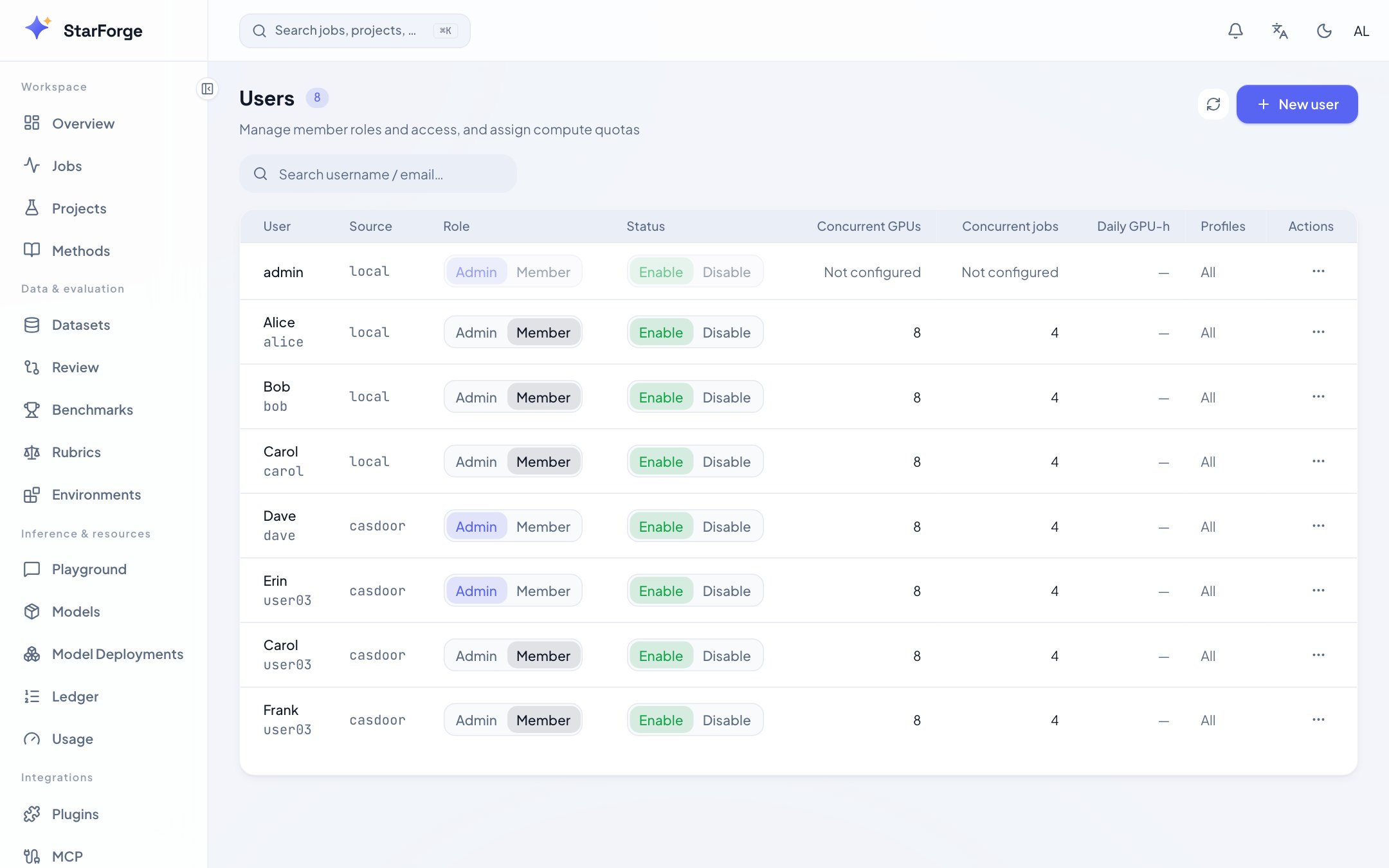 Accounts and what each may spend, at `/admin/users`. Administrators only. The CLI equivalents are
on [`tp admin`](/en/cli/admin).
## What you see
| Column | What it is |
| ------------ | ------------------------------------------------------------------------------ |
| **Username** | The account. Local, or created on first SSO sign-in |
| **Role** | `admin`, `operator` or `auditor` |
| **Status** | Enabled or disabled. A disabled account reads as `401` to the CLI |
| **Usage** | What this person is holding right now |
| **Quota** | Concurrent GPUs and jobs, daily GPU-hours, storage, allowed profiles, priority |
## The three roles
| Role | Reaches |
| ---------- | ---------------------------------------------------------------------------------------------------------------------------------------------------------------------- |
| `operator` | Their own work. The default |
| `auditor` | The [audit trail](/en/console/audit) and nothing beside it. Scoped like an operator, refused like an operator, offered no premium surface, and never exempt from quota |
| `admin` | Everything, including this page |
`auditor` exists so that somebody can read the trail without being able to act on the platform.
That separation is one an MLPS level 3 assessment asks for by name.
## What you can do
| Action | Effect |
| ----------------- | ------------------------------------------------------- |
| **New user** | Creates a local account. Or `tp admin user-add` |
| Change a role | Or `tp admin set-role` |
| Disable or enable | Or `tp admin disable --on` / `--off`. Keeps the history |
| Set a quota | Or `tp admin set-quota` |
| Delete | Removes the account. Their runs' records stay |
## Quota, briefly
| Dimension | Default | Over it means |
| ---------------- | ------------ | ------------------------------------------------------- |
| Concurrent GPUs | 8 | The job waits in `QUEUED` |
| Concurrent jobs | 4 | The job waits in `QUEUED` |
| Daily GPU-hours | 0, unlimited | The job waits, and dequeues after the budget resets |
| Storage, GiB | 0, unlimited | No **new** job is dequeued. Running ones are unaffected |
| Allowed profiles | empty, all | The submission is refused, naming the allowed set |
| Priority | 0 | Higher goes first within the same policy |
`0` means unlimited for the two numeric caps. The reasoning behind each, and how dequeue order
works, is in [roles and quotas](/en/ops/roles-and-quotas).
## Next
[Roles and quotas](/en/ops/roles-and-quotas) · [Teams](/en/console/teams) ·
[Audit](/en/console/audit) · [Settings](/en/console/settings)
Accounts and what each may spend, at `/admin/users`. Administrators only. The CLI equivalents are
on [`tp admin`](/en/cli/admin).
## What you see
| Column | What it is |
| ------------ | ------------------------------------------------------------------------------ |
| **Username** | The account. Local, or created on first SSO sign-in |
| **Role** | `admin`, `operator` or `auditor` |
| **Status** | Enabled or disabled. A disabled account reads as `401` to the CLI |
| **Usage** | What this person is holding right now |
| **Quota** | Concurrent GPUs and jobs, daily GPU-hours, storage, allowed profiles, priority |
## The three roles
| Role | Reaches |
| ---------- | ---------------------------------------------------------------------------------------------------------------------------------------------------------------------- |
| `operator` | Their own work. The default |
| `auditor` | The [audit trail](/en/console/audit) and nothing beside it. Scoped like an operator, refused like an operator, offered no premium surface, and never exempt from quota |
| `admin` | Everything, including this page |
`auditor` exists so that somebody can read the trail without being able to act on the platform.
That separation is one an MLPS level 3 assessment asks for by name.
## What you can do
| Action | Effect |
| ----------------- | ------------------------------------------------------- |
| **New user** | Creates a local account. Or `tp admin user-add` |
| Change a role | Or `tp admin set-role` |
| Disable or enable | Or `tp admin disable --on` / `--off`. Keeps the history |
| Set a quota | Or `tp admin set-quota` |
| Delete | Removes the account. Their runs' records stay |
## Quota, briefly
| Dimension | Default | Over it means |
| ---------------- | ------------ | ------------------------------------------------------- |
| Concurrent GPUs | 8 | The job waits in `QUEUED` |
| Concurrent jobs | 4 | The job waits in `QUEUED` |
| Daily GPU-hours | 0, unlimited | The job waits, and dequeues after the budget resets |
| Storage, GiB | 0, unlimited | No **new** job is dequeued. Running ones are unaffected |
| Allowed profiles | empty, all | The submission is refused, naming the allowed set |
| Priority | 0 | Higher goes first within the same policy |
`0` means unlimited for the two numeric caps. The reasoning behind each, and how dequeue order
works, is in [roles and quotas](/en/ops/roles-and-quotas).
## Next
[Roles and quotas](/en/ops/roles-and-quotas) · [Teams](/en/console/teams) ·
[Audit](/en/console/audit) · [Settings](/en/console/settings)